

We’ve made improvements to the Valuation Rules page to help you manage rules more efficiently and reduce the risk of errors. Here's what’s new:
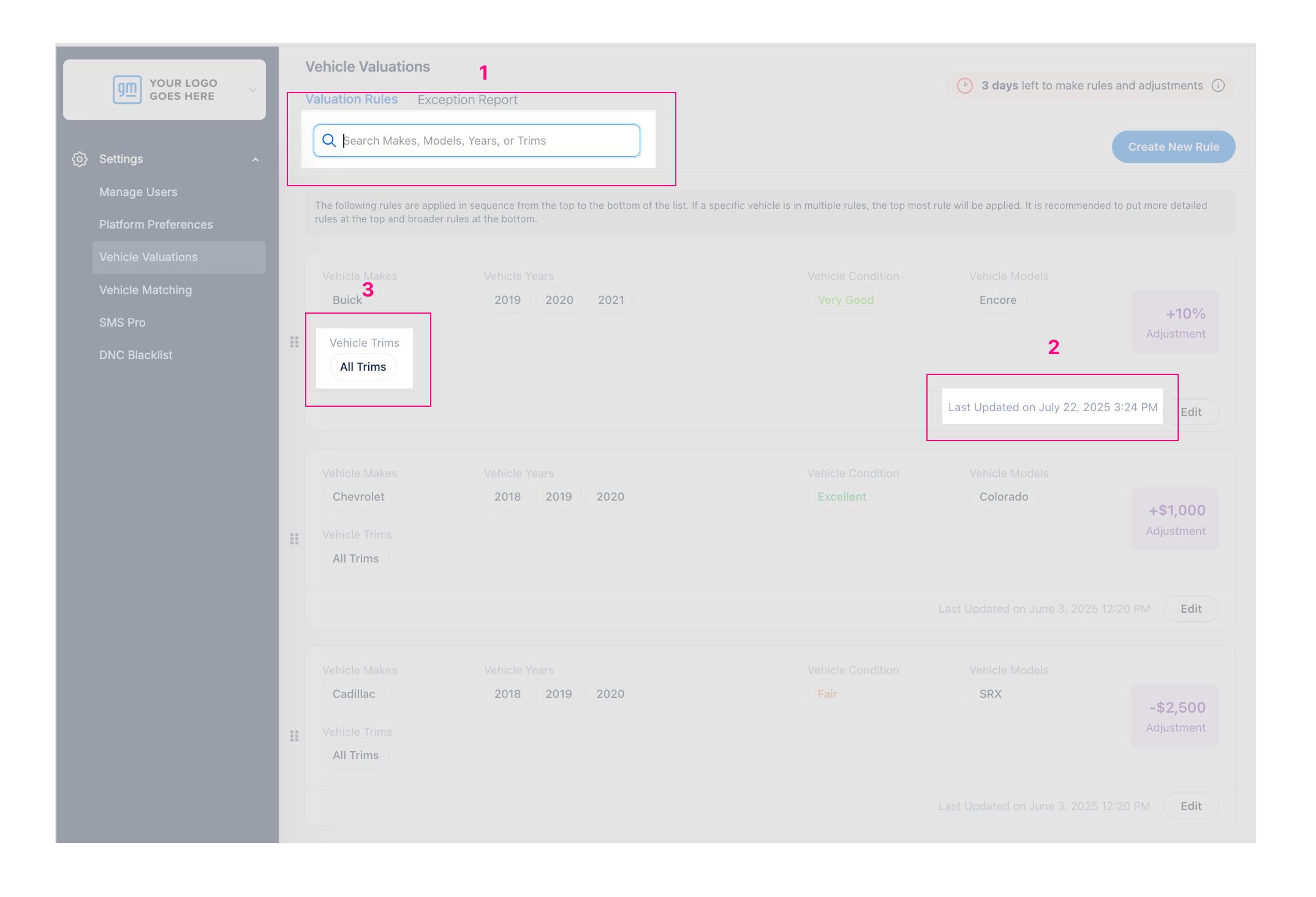
1. Search Bar for Valuation Rules
You can now quickly search for specific rules using the new search bar. Filter Valuation Rules by:
Make
Model
Year
Trim
How it works:
Type in your search term (e.g., “CX-5”) to view matching rules.
The list will update automatically based on your input.
Note: Drag-and-drop reordering is disabled while search is active. To reorder, clear the search.
2. “Last Updated” Timestamp
Each Valuation Rule now displays the date and time it was last updated.
Format: Last Updated on May 30, 2025 02:15 PM
This gives you quick visibility into recent changes and helps keep your rules organized.
3. Visible Trim Levels
Trim levels are now shown directly in the summary view and no need to hover.
This allows for faster reviews and easier rule management at a glance.
These enhancements are designed to make the Valuation Rules page more intuitive and time-saving.
For more details or support, reach out to your CSM or contact our support team.