

We understand that some dealerships manage unsubscribe requests outside of their DMS - often through their CRM or other platforms. To help you stay compliant, Drive AI now offers a Do Not Contact (DNC) Blacklist feature.
This lets you manually upload and manage a list of customers who should not receive email, SMS, or phone communications. It's especially useful if your Active Data Integration (your live connection to the DMS, CRM, or other systems) doesn’t include unsubscribe data.
How It Works:
Upload bulk lists (CSV files) or add/remove single contacts to your blacklist via the Drive AI portal.
Contacts on this blacklist will not receive communications from Drive AI campaigns.
This feature works alongside existing Consent Flags and does not change them.
Communication Rule:
Customers on the DNC Blacklist will not receive communications from Drive AI, regardless of their opt-in or opt-out status.
Note:
This doesn’t change the Marketing Consent Flags in Drive AI. Customers will remain opted in or out based on their existing consent status. The DNC Blacklist only affects the Contactable Flags, which means Drive AI will block messages to blacklisted contacts at the time of deployment.
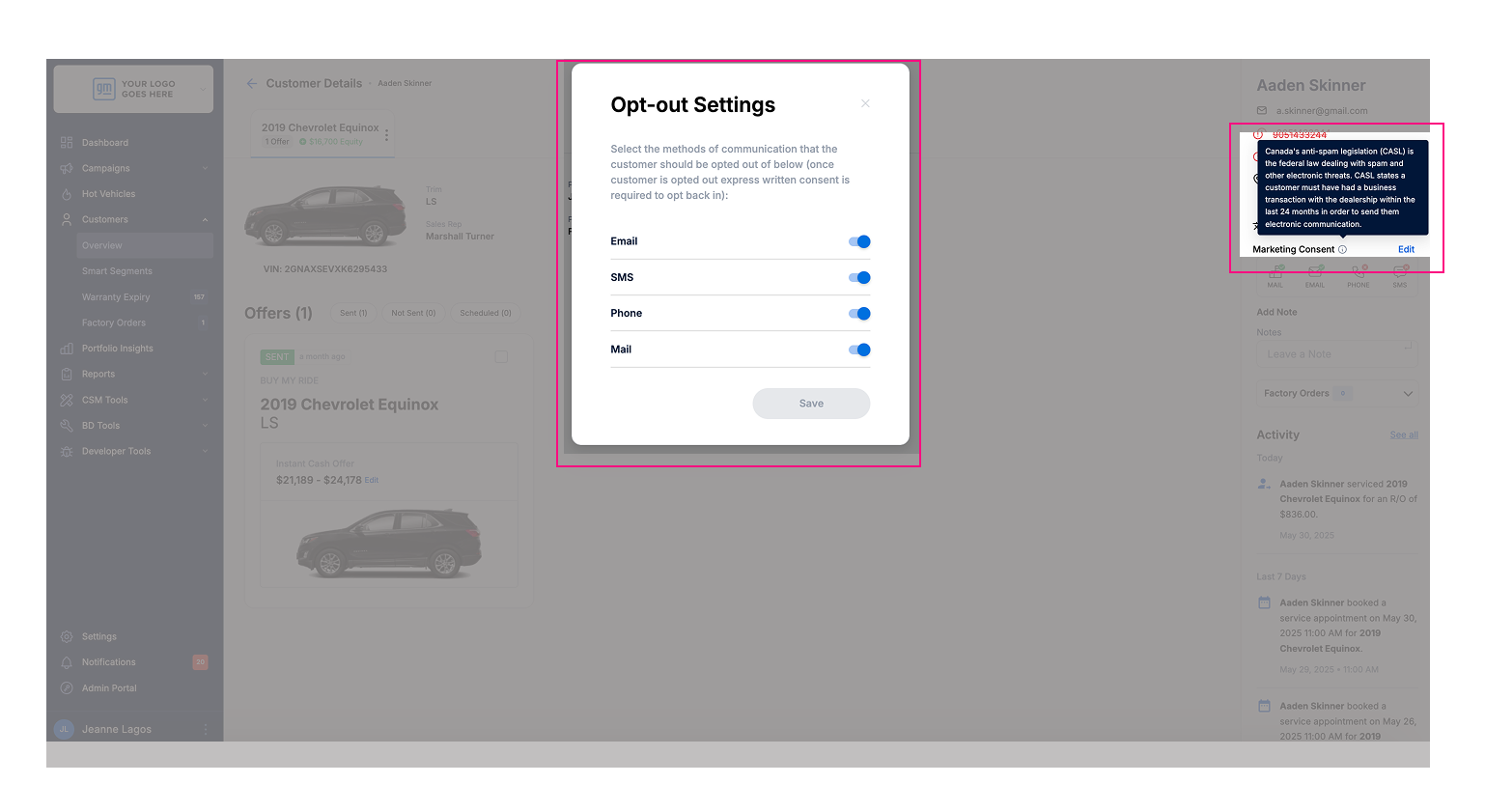
📧 Marketing Consent Flag
Indicates whether a customer has opted in or out of receiving marketing communications based on their consent status.
This flag does not change when a customer is added to the DNC Blacklist.
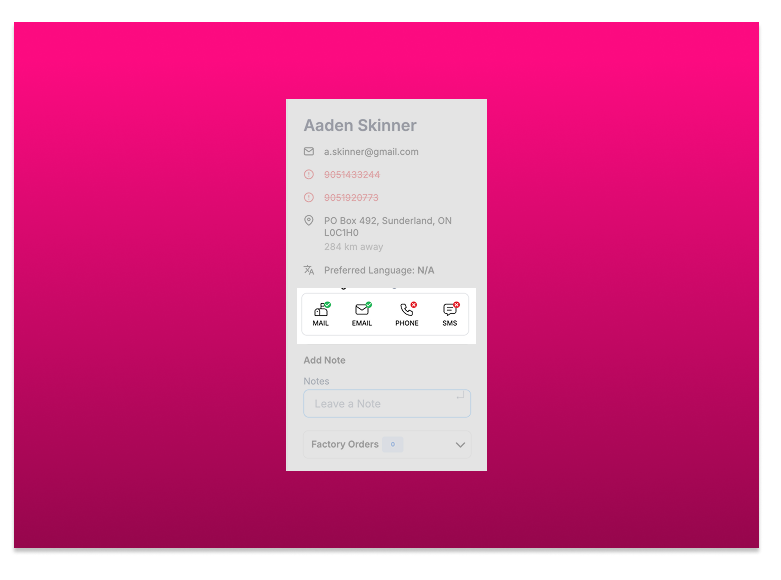
✅ Contactable Flag
Determines if a customer can actually receive an email or SMS at the time of sending.
This flag takes into account the DNC Blacklist and consent status.
Example Explanation:
In the Marketing Consent Flag, the customer has opted in to receive communications via Email, SMS, Mail, and Phone.
However, in the Contactable Flag, SMS and Phone are marked with a red X, meaning the customer cannot currently be contacted through those channels, because their phone number is on the DNC Blacklist.
Smart Segments
You can continue creating Smart Segments as usual.
The DNC Blacklist does not affect how segments are created, it only affects who receives email or SMS communications.
This means a segment may contain customers who are on the DNC Blacklist, but Drive AI will automatically exclude those contacts when you send email or SMS communications.
Example:
Dealer A creates a Smart Segment for VIP customers. The segment includes 1,000 customers.
Dealer A then uses this segment to launch Smart Campaigns.
If 50 of those 1,000 customers are on the DNC Blacklist, Drive AI will only send the email or SMS communication to 950 customers.
Important Clarifications:
1) Customer Counts
Some dealers believe the total number of Active Customers shown in Drive AI already excludes those on the DNC Blacklist.
This is not correct.
The DNC Blacklist only applies at the time of sending email or SMS communications.
Example:
Dealer A has 10,000 Active Customers in Drive AI.
200 of those customers are on the DNC Blacklist.
When Dealer A checks the "Active Customers" list, it will still show 10,000, not 9,800.
Drive AI will automatically exclude the 200 blacklisted contacts only when sending email or SMS communications.
2) DNC Blacklist vs. Customer Portfolio
It’s important to note that not all contacts in the DNC Blacklist will necessarily exist in the dealer’s Drive AI customer portfolio.
Dealers can upload any email addresses or phone numbers to the DNC list, even if those contacts aren’t part of their existing customer base in Drive AI. This is helpful when a lead, prospect, or past contact unsubscribed through a different system like a CRM, but never became a customer in Drive AI.
Uploading a DNC list simply tells Drive AI, “Do not send email or SMS communications to these contacts,” regardless of whether they’re in the customer portfolio or not.
This is especially valuable for dealers whose CRMs are not synced with Drive AI.
Example:
A dealership uploads a DNC list with 4,600 email addresses or phone numbers.
Their Drive AI customer portfolio contains 14,700 customers.
Not all of the 4,600 contacts will match someone in the 14,700. But those that do will be excluded from receiving email or SMS communications when a campaign is sent.
3) Viewing Matched Customers in the DNC Blacklist
When uploading a DNC list, not every email or phone number will match a customer in your Drive AI portfolio. Some contacts may belong to leads who never became customers, while others may be duplicates linked to the same customer.
For example, you might upload 10,000 phone numbers or emails, but only 8,000 of them match customers in your portfolio. This happens because:
Some contacts don’t belong to any customer in Drive AI
Some customers have multiple contact entries (e.g., email + phone)
Drive AI now shows:
The total number of customers matched to your DNC Blacklist
Which customers are linked to each email or phone number
This makes it easier to understand who will be excluded from email or SMS campaigns.
4) Not Contactable" vs DNC Blacklist
The "Not Contactable" label in Portfolio Insights refers to customers who cannot be
reached by SMS, phone, or email - this could be due to missing contact info or customer
opt-outs.
This is different from the DNC Blacklist, which is a list you upload to manually block
specific phone numbers or emails from receiving campaigns.
Both affect communication, but in different ways.
Here’s a step-by-step guide on how to use the DNC Blacklist feature in Drive AI.